
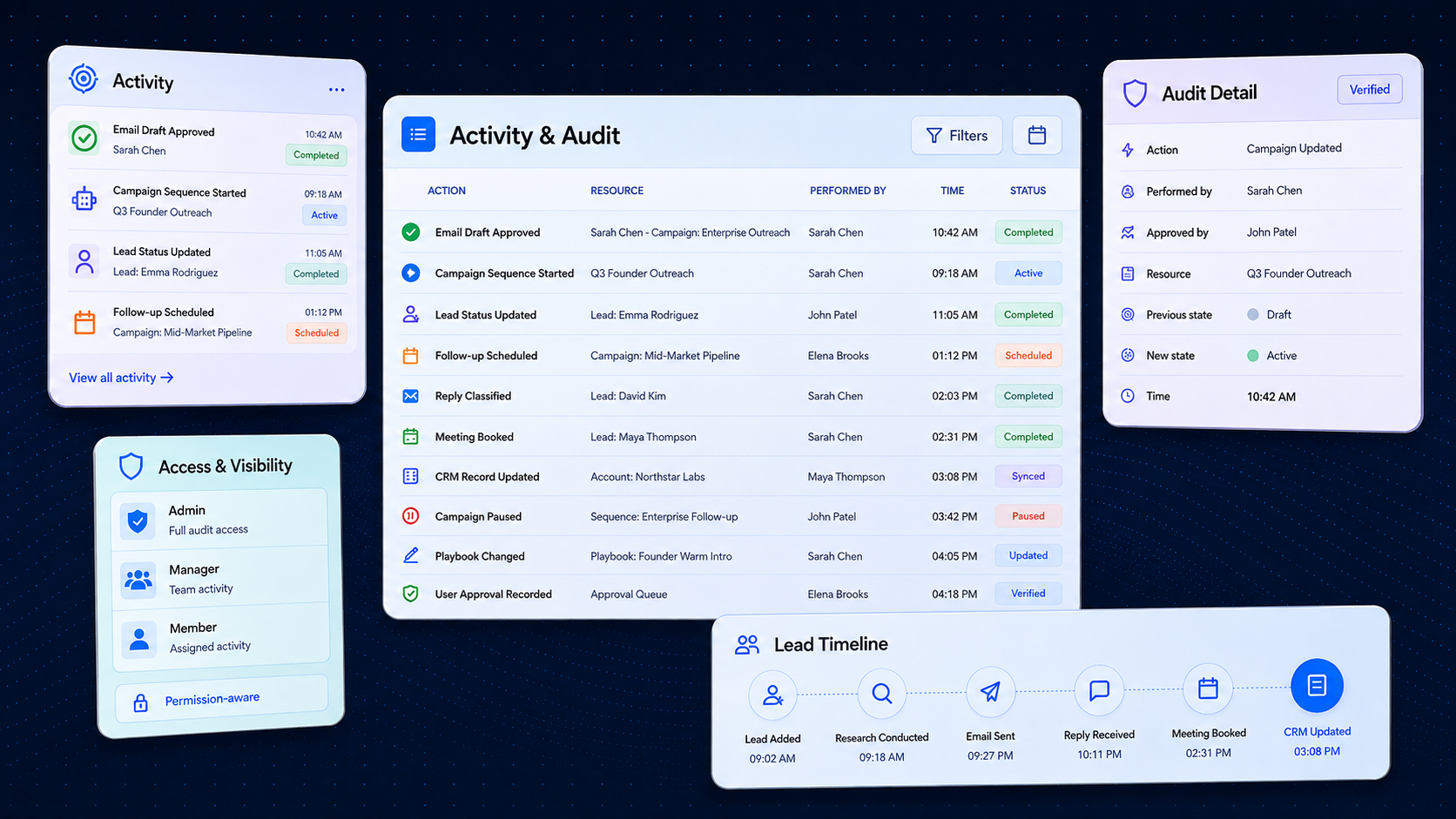
Why Fragmented Logs Are Not Enough
Outbound work moves across Leads, Campaigns, Drafts, channels, replies, CRM and Meetings. Teams need a consistent way to understand what occurred without treating every alert or technical log as formal evidence.
History Spread Across Modules
A single workflow creates records across Campaigns, channels, CRM, and Meetings, making full history hard to reconstruct.
Notifications Are Not History
An alert communicates immediate awareness, but it does not serve as permanent operational audit evidence.
Approval vs Execution Gaps
A request may be approved while actual execution remains pending, blocked, or failed downstream.
Unclear Responsibility
Requesters, approvers, execution runners, and third-party APIs participate without unified audit attribution.
Access Boundaries Expiry
Historical log access needs strict boundary limits so temporary participants do not retain permanent visibility.
Unsearchable Event Streams
Raw unstructured logs force teams to manually piece together timeline events during compliance reviews.
One Material Occurrence.
The Right View for Each Purpose.
One material occurrence may affect several parts of AIVA, but each authorized audience needs a view designed for its own question—not one unrestricted feed containing every detail.
Different Views for Personal Work, Workspace Operations,
Organization Oversight & Formal Evidence
AIVA separates personal Activity, Workspace operations, Organization governance and formal evidence so each audience can answer the right question at the correct scope.
My Activity
"What have I done, requested, approved or caused?"
- User’s own actions
- Requests
- Approval decisions
- AIVA actions performed on user's behalf
- Account changes
- Relevant results
- Follow-up actions
My Activity does not permanently grant access to resources the user can no longer access.
Workspace Activity
"What has happened operationally in this Workspace?"
- Campaign and channel outcomes
- Member actions where permitted
- Operational changes
- Waiting, blocked, denied, failed and partial outcomes
- Affected resources
- Relevant next steps
Workspace Activity does not grant sibling-Workspace visibility.
Organization Oversight
"Which governance, commercial or risk conditions affect the Organization and its Workspaces?"
- Workspace ownership
- Workspace lifecycle
- Material Membership changes
- Budget or commercial risk
- Shared-connection risk
- Security attention
- Unresolved owner obligations
Organization Oversight must not expose raw cross-Workspace operational content.
Formal Audit
"What accountable evidence exists for a sensitive, protected or material action?"
- Ownership changes
- Sensitive role changes
- Protected approvals
- Security-relevant actions
- Export actions
- Workspace lifecycle
- Important commercial changes
- Internal access where customer-safe evidence is required
Formal Audit is not the default feed for every routine action.
See the History of the
Resource You Are Working On
Resource Timelines can keep relevant history close to the Lead, Campaign, Draft, mailbox, conversation or other supported resource—so users can understand changes without leaving their current workflow.
Answers Resource Questions Like:
Select Resource Timeline
Lead Profile: John Doe
VP of Product, TechCorp
Imported into a list
10 mins agoEnrichment completed
8 mins agoContact verification updated
7 mins agoAdded to a Campaign
5 mins agoEmail step waiting
3 mins agoPositive reply received
1 min agoCRM state updated
Just nowUnderstand What AIVA
Completed, Observed and Recommended
AIVA Activity can help authorized users understand relevant work performed, observed or recommended by AIVA, together with the affected resource, result and next step.
Work actively executed by AIVA on behalf of the user or system, including research, draft creation, and configuration checks.
Know What Requires Awareness—and What Still Requires Action
Notifications help users notice important changes or required actions. Owner Attention keeps unresolved Organization-governance responsibilities visible until the source condition is addressed.
Notification Center
"What requires my awareness, decision or immediate action?"
Owner Attention
"Which unresolved Organization-governance obligations require an authorized owner?"
Understand Who Requested,
Decided and Executed
One outcome may involve a requester, approver, AIVA, the AIVA system and an external provider. Activity should distinguish their roles rather than presenting them as one actor.
Requested by
Identifies the human user or scheduling rule triggering the task.
Approved or denied by
Tracks the governance policies or workspace owners authorizing the step.
Initiated through
Specifies the exact user interface, API trigger, or webhook starting the run.
Executed by
Identifies the specific autonomous runtime or system handler processing the task.
Provider response
Captures the direct status or API payload returned by the external service.
Affected user or resource
Pinpoints the targeted mailbox, CRM record, or workspace data resource.
Final known outcome
Summarizes the ultimate result, completed checks, and reasons.
See the Difference Between
Requested, Approved, Executed and Completed
A request can be approved without executing, accepted without completing or partially completed across several resources. AIVA’s Activity model should keep those states distinct.
Initiation & Queue
The initial action is registered and logged in the system queue.
Held in queue pending rate boundaries or database sync checkpoints.
Governance Gates
Verified and approved by rules or manual admin authorization.
Explicitly rejected by safety boundaries or manual workspace owner veto.
Automatically halted due to invalid settings, bounce risks, or inactive mailboxes.
Execution Thread
Allocated to an outbound queue or delayed dispatch slot.
Actively processed by the runtime orchestrator and calling APIs.
Outcome & Resolution
Successfully finished across all targeted resources.
Succeeded for some assets while failing or skipped on others.
Unable to execute due to system exceptions or API errors.
Adjusted down-funnel to resolve differences and restore correct state.
Find the Right History
and Continue from Context
Authorized users should be able to locate relevant history by actor, resource, result, module or time and continue to the affected resource where their current access allows.
Discovery & Filtering
Locate actions taken by specific users, system policies, or AIVA runtimes.
Find logs and timelines for specific mailboxes, leads, or sequences.
Isolate events within CRM sync, LinkedIn outreach, or DNS alignment.
View only successful runs, safety blocks, warnings, or failures.
Track down modifications within specific time windows and dates.
Examine compliance logs across multiple operational teams.
Segment logs by security triggers, settings changes, or campaigns.
Contextual Action
Trace an action from initial scheduling through execution to outcome.
Navigate directly from audit views to the corresponding lead or mailbox.
View SPF/DKIM verification checks or direct provider API payloads.
Quickly resolve credentials or retry failed steps from the log view.
Activity Visibility Follows Current
Role, Scope and Data Sensitivity
A user’s ability to open an Activity page does not automatically grant access to every event, resource, sensitive field, export or follow-up action.
Authorization Decisions
Separate authorization gates
- Surface access: Access to the activity view dashboard itself.
- Event access: Access to view individual log items and specific occurrences.
- Resource access: Permissions to view the affected workspace resources.
- Sensitive-field visibility: Granular hiding or masking of sensitive database fields.
- Search access: Permissions to perform specific search queries.
- Audit access: Clearance to read raw cryptographic compliance records.
- Export access: Authorizations to download logs or stream feed events.
- Action access: Rights to run follow-ups, retry steps, or change configuration.
Visibility Levels
Public visibility options
- Full detail: Complete parameters and values visible to administrators.
- Masked detail: Obscured sensitive records, credentials, and tokens.
- Generalized detail: Abstract descriptions showing actions without raw values.
- Summary-only: Metadata aggregation without individual item histories.
- Restricted: Halted views showing only event existence verification.
- Not discoverable: Events hidden from feeds and indexing for non-owners.
Historical Access Principles
Key constraints and guidelines
Performing an action does not grant permanent access to view the event later.
Creating a resource does not grant permanent access if resource ownership shifts.
Previous ownership does not grant permanent access after membership changes.
Receiving a Notification does not grant background access to deep audit logs.
Holding an old deep link does not grant access if current credentials expire.
Current role, membership, scope, and policy remain relevant for active authorization.
Durable Evidence for Sensitive
and Material Actions
Formal Audit is designed for accountable evidence around sensitive, protected or material actions—not as a general feed for every routine operation.
Audit Detail Panel
Visibility Across the AIVA Workflow
Activity and Audit can connect relevant actions and outcomes across AIVA’s lead-to-meeting workflow while preserving the meaning and authority of each product area.
Lead Preparation
Activity surrounding lead ingest, curation, and cleansing.
- Lead imported
- Enrichment completed
- Contact verification changed
- Suppression applied
- Campaign eligibility changed
Campaigns & Messaging
Drafting, editing, and queueing outreach sequences.
- Campaign created
- Launch requested
- Approval changed
- Draft generated / edited
- Message step sent / waiting
- Message step blocked / skipped
Channels & Accounts
Connecting mailboxes, readiness status, and account credentials.
- Mailbox connected
- Sender readiness changed
- LinkedIn re-authentication alert
- Provider action accepted
- Provider action failed
Replies, CRM & Meetings
Detecting meeting intents, updating CRMs, and booking calendar steps.
- Reply classified
- Follow-up assigned
- CRM write completed / failed
- Meeting intent detected
- Booking completed / changed
Governance & Commercial
Workspace ownership recovery, budget caps, and membership limits.
- Member role changed
- Workspace owner changed
- Workspace lifecycle changed
- Budget warning / Credit action
- Shared connection changed
AIVA-Assisted Work
Autonomous drafts, policy barriers, and guided recommendations.
- Research completed
- Draft recommendation produced
- Governed action attempted
- Action blocked by permission
- Action blocked by readiness
Accountability Without
Unrestricted Surveillance
Clear Activity and accountable evidence do not require every user, Admin or Organization Owner to receive unrestricted access to every Workspace, message or internal system trace.
Activity Connects to Governance
and Execution Across AIVA
Activity and Audit can connect relevant actions and outcomes across AIVA’s lead-to-meeting workflow while preserving the meaning and authority of each product area.
Workspace Governance
Explore Organization and Workspace ownership, Membership, roles, protected actions and cross-Workspace governance.
Trust & Security
Understand AIVA’s access boundaries, sensitive-action protection and trust posture.
Chat with AIVA
See how AIVA can explain blockers and support governed actions without expanding a user’s authority.
Multi-Channel Campaigns
Explore the operational Campaign workflows that produce relevant Activity across Email and LinkedIn.