
Govern AIVA
Across Every Workspace
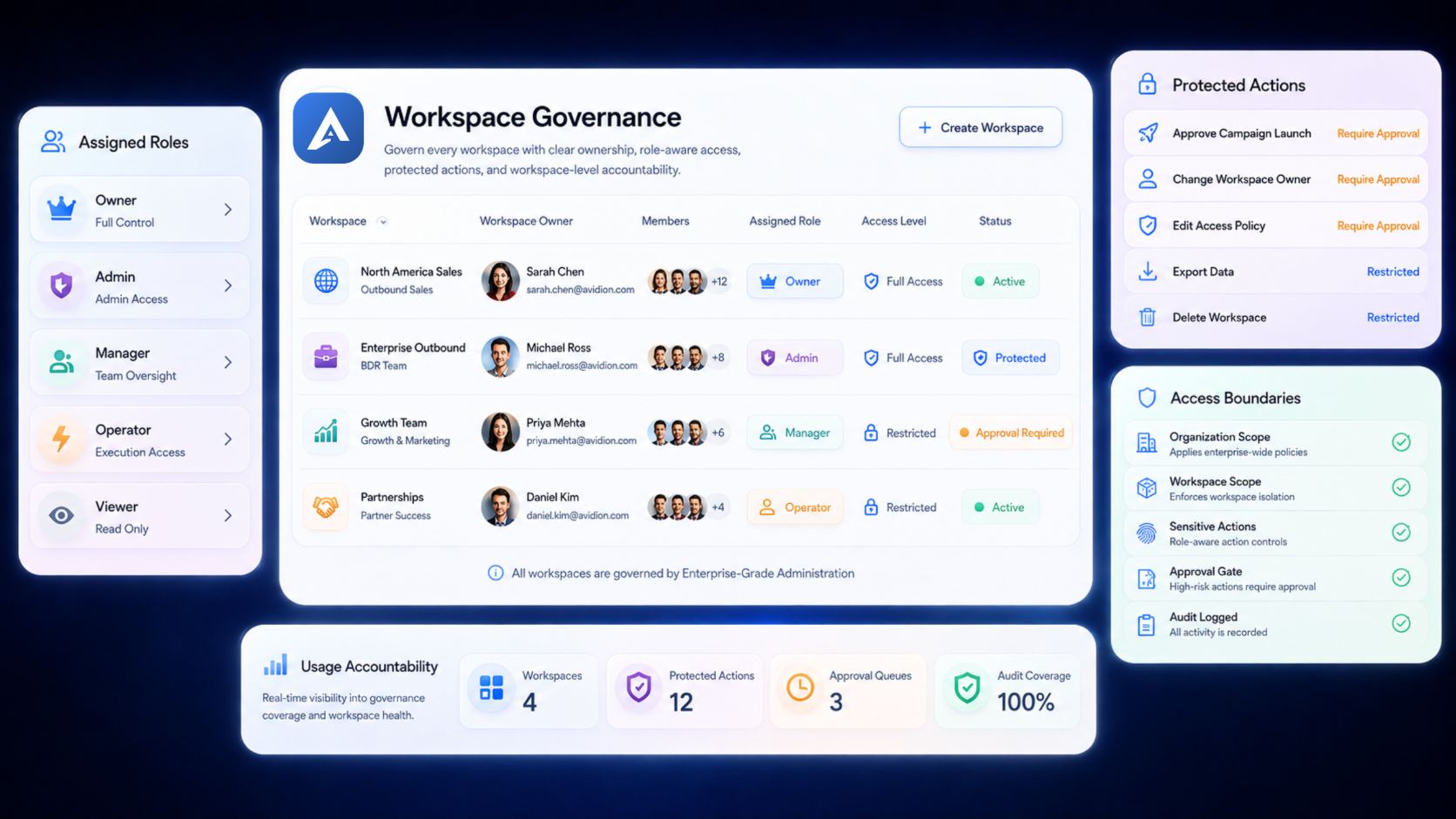
Separate company-level authority from day-to-day outbound operations with clear ownership, role-aware access, protected actions and Workspace-level usage accountability.
Enterprise-Grade Administration. AIVA provides secure boundary controls that guarantee alignment with company compliance rules.
Why Multi-Workspace Outbound Needs Governance
As more teams use AIVA, companies need more than basic user roles. They need clear ownership, controlled Workspace creation, accountable usage and stronger protection for high-impact actions.
Unclear Ownership
A Workspace needs an accountable operational owner—not authority inferred only from who created it.
Access Authority Levels
Governance, operations, and specialized team roles should not collapse into one generic Admin role.
Company-Funded Usage
Credits, seats, and API usage need clear attribution as multiple team workspaces consume shared value.
Sensitive Changes
Ownership transfers, budgets, and lifecycle actions require strict authorization and confirmation controls.
Unresolved Attention
Workspace owners need clear visibility into critical security or compliance issues requiring action.
Audit & Compliance Blindspots
Lack of centralized activity logging makes tracing administrative changes across team workspaces difficult.
One Organization. Multiple Operational Workspaces.
The Organization represents the company-level governance and commercial relationship. Each Workspace remains an isolated operating environment for teams, data, connected accounts and outbound execution.
Organization governs
Workspace operates
A Dedicated Center for
Company-Level Governance
The Organization Center sits above day-to-day Workspace operations. It gives authorized Organization users a permission-aware place to review Workspaces, ownership, company-funded usage, shared connections, security posture and material governance attention.
Organization Center
Core Verified Areas
Owner Console
Primary Owner Control
Role-Aware Experience
Context Projections
Review Governance State
Without Opening Raw Workspace Content
Authorized Organization users can review the governance state of each Workspace without automatically receiving access to its raw leads, messages, Campaigns, Drafts or CRM records.
Workspace Directory content
Where implemented and permitted, show:
- Workspace name
- Workspace purpose
- Primary Workspace Owner
- Additional Workspace Owners
- Lifecycle state
- Access or execution state
- Budget state
- Usage summary
- Member count
- Security state
- Shared-connection health
- Owner Attention
- Recent material governance change
- Required governance boundary
Exclude
Strictly Shielded Content:
- Raw leads
- Lead contact details
- Campaign content
- Draft content
- Email or LinkedIn messages
- CRM record content
- Meeting notes
- Uploaded files
- Credentials
- Secrets
- Raw provider responses
- Internal support notes
Clear Ownership at
Company and Workspace Level
AIVA separates company ownership from Workspace operational ownership so authority remains explicit, accountable and recoverable.
Organization Owner
Buyer-safe governance
- Governs Organization-level structure
- Oversees Workspace existence
- Confirms accountable Workspace ownership
- Governs company-funded value
- Manages Organization-level policy and protected actions
- Supports owner recovery and succession
- Does not automatically receive raw Workspace access
Workspace Owner
Operational governance
- Governs day-to-day Workspace operations
- Manages Workspace settings and permitted Membership
- Remains accountable for safe Workspace use
- Reviews operational blockers and owner obligations
- Does not receive sibling-Workspace or company-wallet authority
Additional Ownership Concepts
Key constraints and guidelines
Each active Workspace needs an accountable Primary Workspace Owner.
Additional Workspace Owners may be allowed under Organization policy.
Creator status does not establish permanent authority.
Resource ownership does not become Organization or Workspace ownership.
Ownership transfer and recovery are protected actions.
Give People the Right Access at the Right Scope
AIVA separates where a person belongs, what responsibility they hold and where their authority applies.
Membership
Where the person belongs:
Organization, Workspace, or both.
Role
Baseline responsibility:
Owner, Admin, Manager, Member, or Viewer.
Capability
Specialized responsibility:
Billing, Export, Integration management, Approval, Security, or Campaign oversight.
Scope
Where access applies:
Organization-wide, One Workspace, Team, Resource, Assigned records, or Self-related information.
Note:
An action requires both sufficient authority and the correct scope. Permission does not automatically satisfy approval, security, entitlement, budget, readiness or runtime conditions.
Add Stronger Controls
Where the Impact Is Higher
High-impact actions can require additional confirmation, approval, stronger authentication or system-level protection before they proceed.
Protected-action examples
Concise selection of protected operations:
- Create an additional Workspace
- Appoint or transfer an owner
- Change Workspace funding or budgets
- Change a shared connection
- Export sensitive information
- Elevate access
- Suspend or archive a Workspace
- Initiate destructive lifecycle actions
Control layers
Verification protections:
- Permission
- Scope
- Impact preview
- Confirmation or reason
- Approval, where required
- Reauthentication or 2FA, where required
- Final execution checks
- Durable evidence
Create and Manage Workspaces
Through Governed Workflows
Additional Workspaces should enter the Organization through a governed workflow with explicit ownership, Membership, funding and lifecycle outcomes.
| STAGE | GOVERNED WORKFLOW ACTION |
|---|---|
| 01 Identification | Workspace need is identified. |
| 02 Request | An authorized user requests or initiates creation. |
| 03 Preconditions | Plan, policy and security preconditions are checked. |
| 04 Ownership | An eligible Primary Workspace Owner is identified. |
| 05 Approval | Organization authority approves where required. |
| 06 Provisioning | The Workspace is provisioned. |
| 07 Membership | Membership and access outcomes are applied explicitly. |
| 08 Funding | Funding is assigned separately where applicable. |
| 09 Operations | The Workspace becomes operational only after required checks. |
Keep Company-Funded Usage
Accountable by Workspace
The Organization owns the plan and company Credit wallet. Workspace budgets help control and attribute how that company-funded value is used.
Organization plan and wallet
- Owned at Organization level
- Represents the company’s commercial relationship
- Remains subject to current Pricing authority
Workspace budget
- Controls or guides Workspace spending
- Is not an independent wallet
- Does not transfer ownership of Credits
- May include warning or restriction behavior where implemented
Organization Plan and Credit Wallet
Subject to current Pricing authority
Workspace A
HealthyWorkspace B
WarningWorkspace C
RestrictedSee Governance Risk
Without Exposing Sensitive Workspace Data
Organization-level governance can surface material ownership, security and shared-connection issues while preserving least-privilege access to Workspace content.
Compact Health Visual
| Area | State |
|---|---|
| Ownership | Healthy |
| Security | Needs attention |
| Shared CRM connection | Reauthentication required |
| Workspace | Restricted |
| Raw Workspace content | Access not granted |
* Note: Connection health is visible without exposing raw credentials, secrets, or individual message logs. Security posture excludes unsupported scores.
Shared-connections direction
- Some connections may be shared or governed at Organization level.
- Credentials and secrets remain protected.
- Connection health can be visible without exposing the credential.
- Reauthentication or ownership attention may be required.
Organization intervention boundary
- Organization authority may restrict, suspend or govern the Workspace container.
- Intervention does not automatically grant raw-content access.
- Any exceptional access must be purpose-bound, authorized and separately evidenced where supported.
- Internal support authority remains separate from customer Membership.
Implemented Content Areas
Turn Governance Actions
into Clear Accountability
Material governance actions should remain attributable and reviewable, while unresolved obligations stay visible to the owners responsible for acting on them.
Organization Oversight
A summarized view of material governance matters across the Organization.
Formal Audit
Accountable evidence for sensitive and material changes.
Owner Attention
Unresolved governance obligations requiring action from an authorized owner.
AIVA Follows the Same
Governance Rules
AIVA-assisted actions remain subject to the same permissions, scope, approvals, security, commercial and runtime controls as actions started elsewhere in the product.
Required concepts
- AIVA receives only permitted, tenant-scoped information.
- AIVA recommendations do not grant authority.
- An action is rechecked before execution.
- AIVA cannot bypass approvals.
- AIVA cannot bypass security or commercial restrictions.
- AIVA cannot reveal restricted resources through explanations.
- AIVA may explain why an action is blocked and what is required next.
AIVA Decision Card
Create a new Workspace
Organization Owner approval required
Review the Workspace request
Control Without
Unrestricted Access
Strong company governance does not require every owner or Admin to receive unrestricted access to every Workspace, message or prospect record.
Workspace Governance does
- Establish accountable ownership
- Govern Workspace creation and lifecycle
- Separate roles and scopes
- Protect sensitive actions
- Attribute company-funded usage
- Produce governance evidence
- Apply controls to AIVA actions
Workspace Governance does not
- Grant raw-content access by default
- Make creators permanent owners
- Make every Admin a universal Admin
- Let owners bypass system controls
- Turn Workspace budgets into wallets
- Expose internal forensic traces
- Give AIVA unrestricted authority
Governance Connects to the
Rest of AIVA
Route visitors to related product capabilities without duplicating their content.
Activity & Audit
Understand what happened, who or what caused it, what was affected and where accountable evidence exists.
Trust & Security
Explore AIVA’s protected actions, access controls, security boundaries and trust posture.
Enterprise
See how AIVA supports larger teams, deeper governance and sales-led commercial requirements.
Chat with AIVA
See how AIVA can explain blockers and support governed actions without bypassing authority.