
Turn Prospect Replies into
Governed Sales Conversations
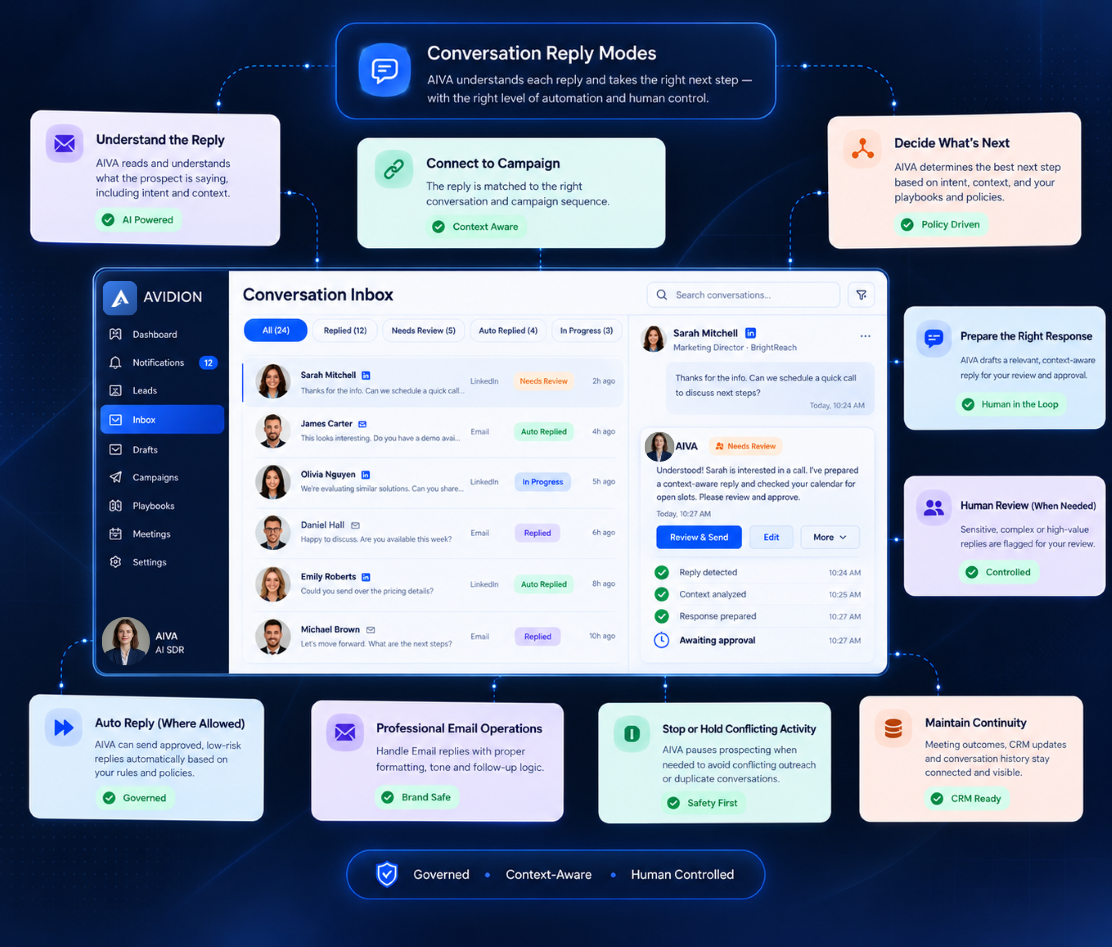
AIVA helps teams understand prospect replies, decide what should happen next, prepare context-aware responses, handle professional Email conversations, and automate eligible replies while keeping humans in control.
The sequence starts the conversation. Context decides what happens next.
Sending Is Only Half the Outbound Workflow
Most outbound workflows are optimized for sending. The harder part begins after someone replies. A prospect may ask a question, show interest, raise an objection, request pricing, ask for a meeting, say they are not interested, redirect you to another person, send an out-of-office response, or continue an existing discussion.
Question
Prospects asking about technical specs, pricing, or Salesforce need direct answers—not another scheduled bump template.
Interested
High-intent buying signals cool off rapidly if they are not immediately identified, prioritized, and answered.
Objection
Timing, budget, or competitor pushbacks require governed context handling, not another generic sequence step.
Meeting Request
Direct asks to meet require instant calendar coordination and ownership routing, not follow-up delays.
Not Interested
Clear opt-outs must trigger instant cross-channel sequence suppression to safeguard domain reputation.
No Reply Needed
Out-of-office notices and automated acknowledgments should be handled without creating false SDR alert fatigue.
One Governed
Conversation Workflow
AIVA brings live prospect conversations into the same governed system as your Campaigns, Draft Intelligence, Email, LinkedIn, Meetings, CRM, permissions, and runtime controls.
PROSPECT REPLY
Inbound Email or LinkedIn
Conversation Context
History, lead data & campaign specs
Reply Intelligence
Intent detection & objection parsing
Next-Action Decision
Autonomous vs Human-in-the-Loop
Reply Draft / Human Action
Grounded draft creation or owner handoff
Review + Runtime Checks
Safety rules, limits & approvals
EMAIL / LINKEDIN RESPONSE
Governed dispatch to prospect
Meetings • CRM • Campaign State
Continuous state & record alignment
Structured Assistance Across Every Touchpoint
When a reply arrives, AIVA can help:
Understand
Interpret the inbound message, thread history, prospect profile, and relevant Campaign context.
Decide
Determine whether a response is needed and whether AIVA or a human sales owner should handle it.
Draft
Prepare a context-aware, grounded reply when appropriate, pulling approved company specs and pricing rules.
Verify
Check the proposed response against conversation context, brand style, and applicable governance safeguards.
Review or Automate
Route the response according to the Campaign's Conversation Reply Mode and current runtime conditions.
Continue
Keep Campaign state, Meetings, CRM continuity, and future outreach aligned with the conversation outcome.
From Prospect Reply to the Right Next Action
What happens when a reply enters AIVA.
Reply received
AIVA connects the reply to the right conversation and prospect.
Conversation understood
The latest message is read with prior context.
Campaign context resolved
Linked to the Campaign that started it, where available.
Prospecting state updated
Meaningful replies pause conflicting automated prospecting.
Next action determined
Decision PointOne of five outcomes, based on the message and workspace rules:
- No response needed
- Respond automatically
- Prepare for review
- Hand off to a person
- Block the action
Response prepared
One Reply Draft is created where appropriate.
Final checks run
Ownership, policy, permissions, state and channel readiness.
Conversation continues
Sent via the right channel → Meetings, CRM, Activity, Campaign.
Choose How AIVA Handles
Live Conversations
AIVA supports three distinct Conversation Reply Modes. Each mode defines who acts on a live reply — your team, AIVA with review, or AIVA under strict eligibility checks.
Manual
Your team controls every response. AIVA can provide conversation intelligence and draft assistance, but a person decides what to send.
Human-in-the-Loop
AIVA prepares. Your team reviews. AIVA can create a response using the conversation context, but the message waits for human review or approval before execution.
Auto Reply
AIVA can respond when the conversation is eligible for automation. It only executes when conversation, policy, ownership, authority, channel and runtime checks allow it.
Conversation Intelligence
Understand the Reply Before Responding
A useful response depends on more than the latest sentence.
Reply draft
Context-aware reply
Latest prospect message
What is the prospect asking or communicating now?
Conversation history
What has already been said?
Originating Campaign
Which outreach strategy started the conversation?
Pitch and CTA context
What was the Campaign trying to achieve?
Lead and company context
What relevant information is already available?
Current meeting state
Is the prospect asking to meet, already booked, or still evaluating?
Current operational state
Has a person taken over? Is outreach paused? Is a response still required?
Context helps AIVA avoid:
- repeating the introduction
- asking questions the prospect already answered
- sending another prospecting message after meaningful engagement
- presenting an outdated CTA
- inventing discounts, commitments or capabilities
- guessing which Campaign owns the conversation
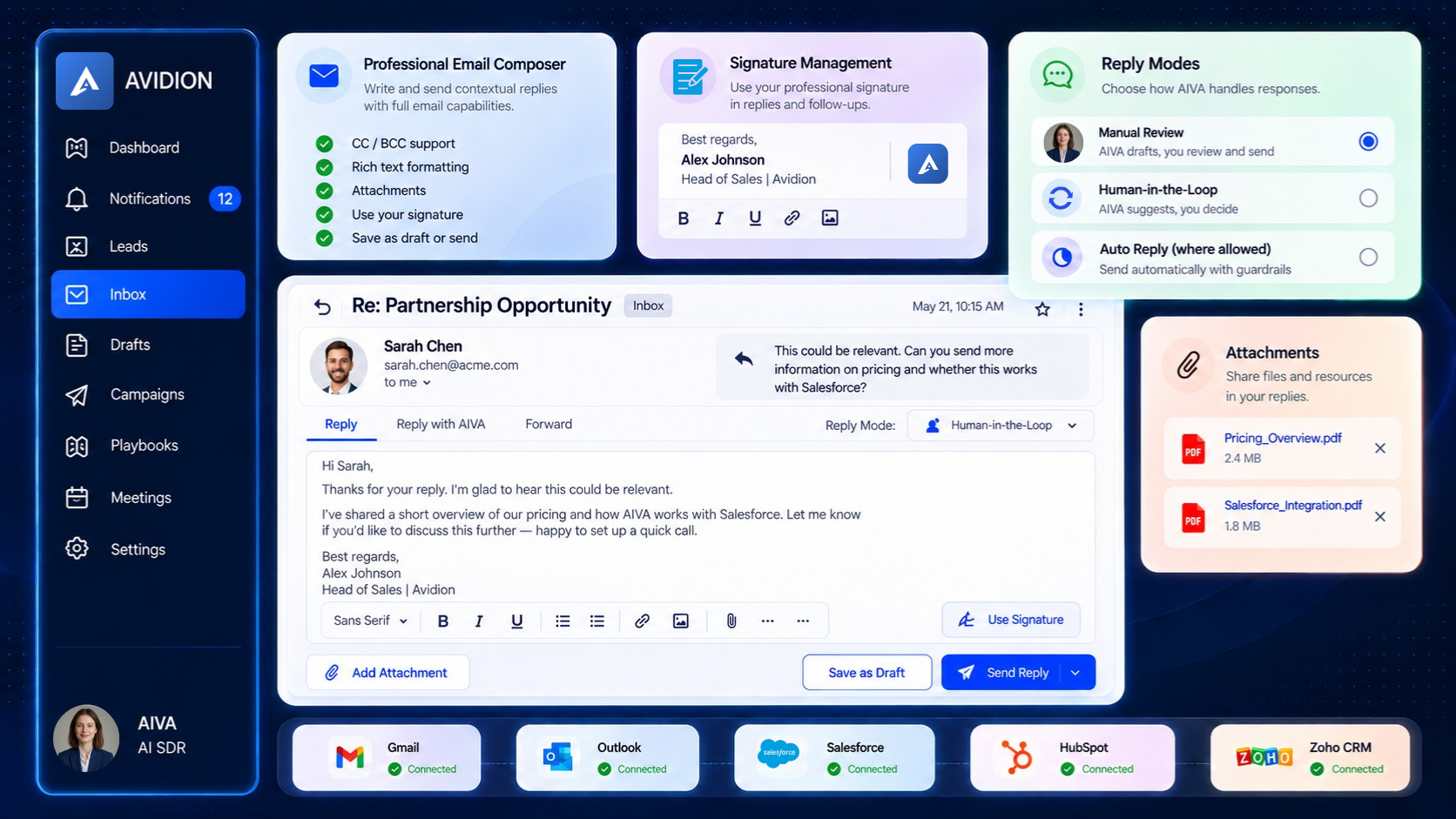
Professional Email Operations
Handle Real Business Email Conversations Inside AIVA
Live sales conversations need real Email controls — not just a text box.
Automation Only When the Conditions Are Right
AIVA does not send a conversation reply simply because AI generated one.
Human takeover
If a person takes ownership of the conversation, autonomous actions stop.
Conversation Reply Mode
The Campaign or workspace must permit the selected level of automation.
Response requirement
Some messages do not need a reply.
Confidence and ambiguity
Unclear context moves toward review rather than forced automation.
Permissions and authority
AIVA does not make commitments beyond allowed business authority.
Suppression and contact controls
Do-not-contact and other applicable restrictions remain hard boundaries.
Current conversation state
A stale draft is not sent after the conversation materially changes.
Channel and provider state
The execution path must still be valid when the response is actually sent.
AI can recommend the next action. AIVA's controls determine whether it is allowed to happen.
Keep the Conversation Connected to the
Rest of the Sales Workflow
A prospect conversation can change what should happen everywhere else. AIVA helps keep those changes connected — not an isolated Inbox feature.
Campaigns
Meaningful replies can stop or hold conflicting future prospecting.
Drafts
A conversation Reply Draft remains one governed draft artifact even when visible from different AIVA surfaces.
Meetings
Meeting interest moves toward the meeting workflow. Intent is not booking — Meetings remains the source of booking truth.
CRM
Selected conversation outcomes continue into CRM where connected and configured.
Email and LinkedIn
Conversation behavior stays channel-aware. LinkedIn threads continue on the correct linked account — never silently switching identity.
Activity & Audit
Important conversation actions and outcomes become part of AIVA's Activity and Audit views.
Controlled Conversation Automation,
Not False Autonomy
Conversation Automation is most useful when it knows when not to automate. AIVA combines AI assistance with conversation context, human ownership, policy, permissions and runtime checks — not an unsupervised agent answering every message.