
Email Outreach Built Into
AIVA's AI SDR Workflow
AIVA helps teams run Playbook-guided email outreach with AI-generated subject and body drafts, review workflows, eligible mailboxes, sender readiness checks, safe daily capacity, reply handling, meeting workflows, and CRM continuity where configured.
Governed AI SDR Workflow. AIVA ensures email outreach is guided by playbooks, checks sender readiness, enforces safe limits, and handles replies automatically, unlike basic cold email senders.
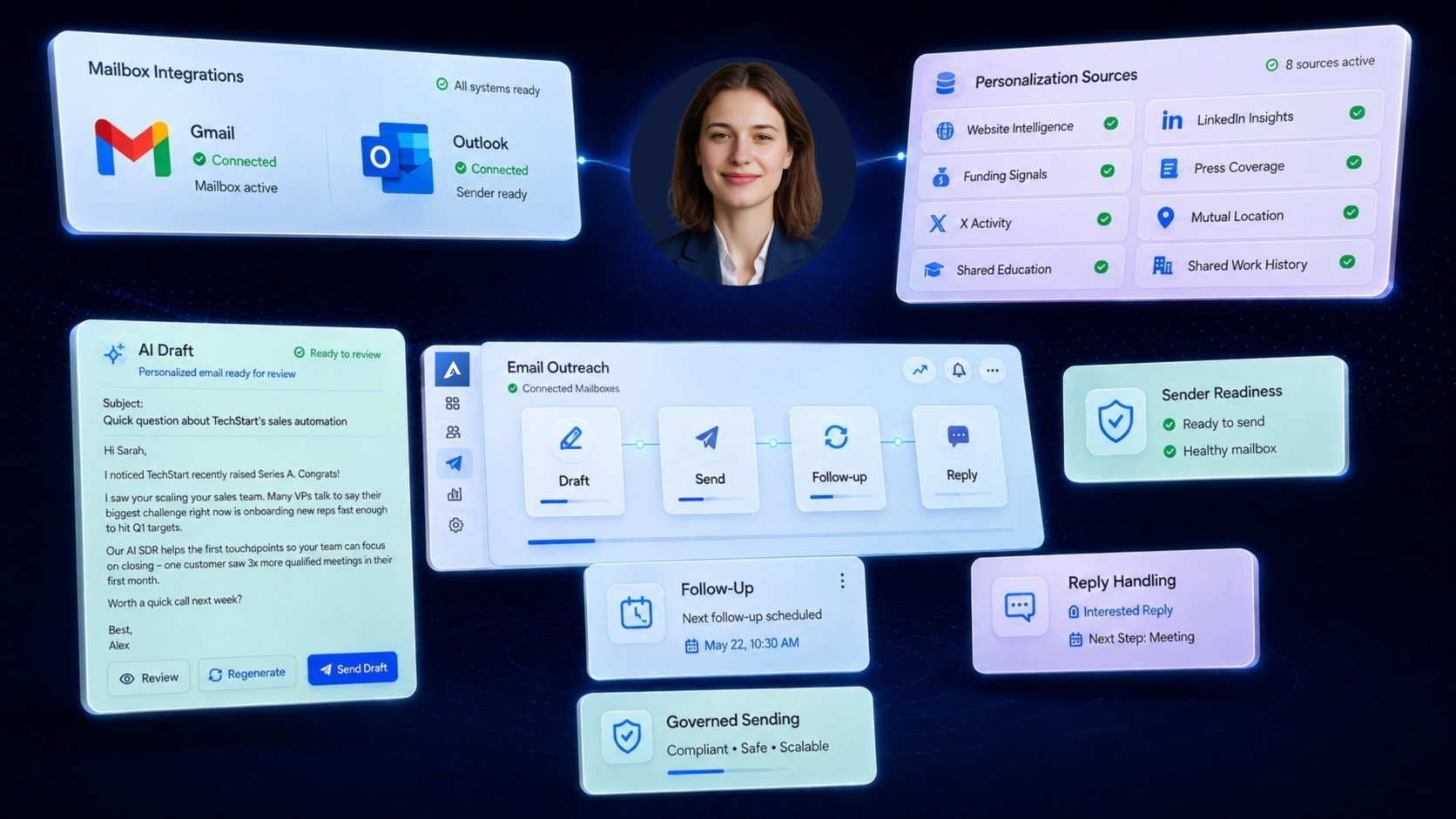
Email Outreach Breaks When Drafts, Senders, Replies, and CRM Are Disconnected
Most email campaigns suffer because they rely on basic cold email senders. Without playbook guidance, mailbox checks, and auto-suppression, teams risk sender health, send generic copy, and lose critical CRM records.
Generic Copy
Drafts may sound polished but disconnected from lead, Playbook, and sequence context.
Sender Risk
Connected mailboxes may not be ready for campaign execution or lack domain protection.
Approval Confusion
Teams may not know what is generated, pending, approved, blocked, or sent.
Broken Follow-ups
Email follow-ups can continue even after replies, meetings, or suppression events.
CRM Gaps
Replies, meetings, and handoff context get lost when email activity is not connected downstream.
Unmonitored Bounces
High bounce rates and spam flags occur when deliverability metrics aren't tracked in real time.
Governed Email Outreach from Draft to Reply
AIVA equips your outbound team with deep playbook messaging controls, mailbox health monitors, auto-suppression, and complete CRM sync.
Where Email Outreach
Fits in the AIVA Workflow
Email Outreach sits inside AIVA’s campaign execution layer. AIVA can generate email drafts, but actual sending still depends on approval state, eligible mailbox selection, sender readiness, safe daily capacity, campaign schedule, lead state, usage limits, suppression rules, and runtime checks.
Outbound Pipeline Fit
AIVA does not send emails in isolation. Email is a major channel, but it is governed entirely within AIVA's larger system check architecture.Lead Database
Prospect ingestion
Playbook
Copy rules & angles
Campaign
Touchpoint sequence
Draft Intelligence
Context compiler
Verifier
Safety & check rules
Review / Approval
Human filter checks
Runtime Checks
Pre-send safety tests
Email Outreach
Governed sending & pacing
Replies / Meetings
Conversion tracking
CRM Continuity
Sync activity state
Learning
Feedback adjustments
Email Steps That Fit Your
Outreach Sequence
Email sequences in AIVA are not just fixed follow-up timers. Each email step can be connected to Playbook strategy, draft generation, approval rules, sender readiness, timing, lead state, and stop conditions.
Email Intro / First Touch
First outbound email based on lead context, Playbook strategy, and campaign goal.
Email Follow-up
Follow-up email that respects sequence timing and previous outreach context.
Email Final Nudge / Breakup
Final email step that closes the loop without aggressive or spammy language.
Approval Checkpoint
Requires human review before a draft can move forward where policy requires it.
Stop Condition & Guardrails
Stops or skips future email steps after reply, meeting booked, DNC, unsubscribe, suppression, or human takeover.
Email Drafts Built from Lead, Playbook, and Sequence Context
AIVA’s email drafts are not generated from a blank prompt. They can use lead context, Playbook strategy, campaign settings, sequence step, personalization signals, email templates, and verifier checks to create subject lines and body copy that fit the campaign.
Subject line
Generated or selected based on campaign context and template rules.
Hi Alex,
I noticed ScaleOps recently expanded your sales dev team by 40%. Given that rapid growth, maintaining consistent playbook quality across reps can be challenging.
AIVA integrates directly with your existing setup to automate outbound drafting so that you can scale touchpoints while respecting sequence steps and tone constraints.
Are you open to a brief walkthrough next Tuesday at 10:00 AM?
Best,
Sarah
Email-Specific Assets
and Sender Identity
Email outreach can use assets and signatures that do not apply to LinkedIn. AIVA should treat banners, images, files, attachments, and signature strategy as email-specific configuration tied to sender identity, campaign context, and step-level rules.
Email template
Defines structure, tone, length, CTA, style rules.
Email sequence step
Defines which template/assets are used for that step.
Sender/mailbox settings
Own sender identity and signature configuration.
Campaign
Can override selected email assets where allowed.
Runtime/verifier
Checks whether assets are valid before execution.
Approved Email Does Not
Mean Sent Email
AIVA separates draft approval from email execution. An email can be generated, approved, scheduled, or queued without being sent. Sending only happens after runtime checks pass and the provider action succeeds.
Drafting
AIVA created the email draft.
Draft is being checked.
Human review is required.
Approval
Content is approved, but email has not necessarily been sent.
Content approved by system rules where policy allows.
Queueing
Waiting for schedule, capacity, approval, or another condition.
Email has an intended send window.
Email is in the execution queue but not yet sent.
Sending
Provider execution is in progress.
Email was actually sent successfully.
Exceptions
Required condition is missing or unsafe.
Draft was valid earlier but context changed.
Email should not send because lead/campaign state changed.
A send/job was attempted but did not complete.
Emails Send from Eligible Mailboxes,
Not Just Connected Inboxes
A connected mailbox is not automatically ready for campaign sending. AIVA’s email execution depends on eligible mailboxes, sender readiness, safe daily capacity, campaign settings, lead state, usage, and runtime checks.
Mailbox Deliverability Overview
Email Replies Should Change
What Happens Next
Email outreach should not continue blindly after a prospect replies. AIVA can help classify replies, stop or skip future steps, route human handoff, trigger meeting workflows, and keep CRM continuity where configured.
Intent Classification & Response Examples
Move Interested Email Replies Toward Meetings and Sales Continuity
When a prospect shows interest through email, AIVA should help move that reply toward the correct next step — booking, handoff, owner assignment, or CRM continuity where configured.
Email Reply
Prospect replies to outbound thread.
Meeting Intent / Handoff
AI reads intent and triggers handoff.
Booking Link / Owner
Sends calendar link or assigns to rep.
Meeting Booked
Prospect reserves time on calendar.
CRM Continuity
Syncs meeting event & contact status.
Outreach Stopped
Future sequence outreach stops instantly.
Ask AIVA What Happened
to an Email Step
AIVA should be able to explain email state in plain language. Ask your co-pilot about pending approvals, block causes, or activity sync continuity.
Explain email delivery
AIVA can explain why an email was not sent or skipped.
Inspect queue delays
AIVA can check which emails are waiting for approval or capacity.
Analyze blockers
AIVA can identify why a sequence step is blocked or slow.
Track reply events
AIVA can tell you if a lead replied or why automation stopped.
Monitor CRM syncs
AIVA can verify if email activities successfully synced to CRM.

AIVA
Your AI SDR Employee
Built for Governed Email Outreach,
Not False Sending Claims
AIVA helps teams run secure, governed email campaigns, but no platform should promise absolute placement, configuration-free execution, or unchecked volume.
Email Outreach Works
Across the AIVA Workflow
Understand how email outreach campaigns interface with database records, customized drafts, and multi-channel marketing cycles.
Multi-Channel Campaigns
Email is one channel inside coordinated Email + LinkedIn Campaigns.
AI Draft Intelligence
Email subject/body drafts come from the draft engine.
Sender Readiness
Email execution depends on eligible mailboxes and safe capacity.
CRM Continuity
Email outcomes can connect to CRM where configured.
Native Meeting Booking
Email replies can create meeting intent and booking workflows.
Chat with AIVA
AIVA can explain blocked, waiting, skipped, or stale email steps.
Integrations
Mailboxes and email providers belong to integration setup.
Trust & Security
Email actions depend on approvals, permissions, suppression, and governance.